
The Complete Guide to Pool Automation
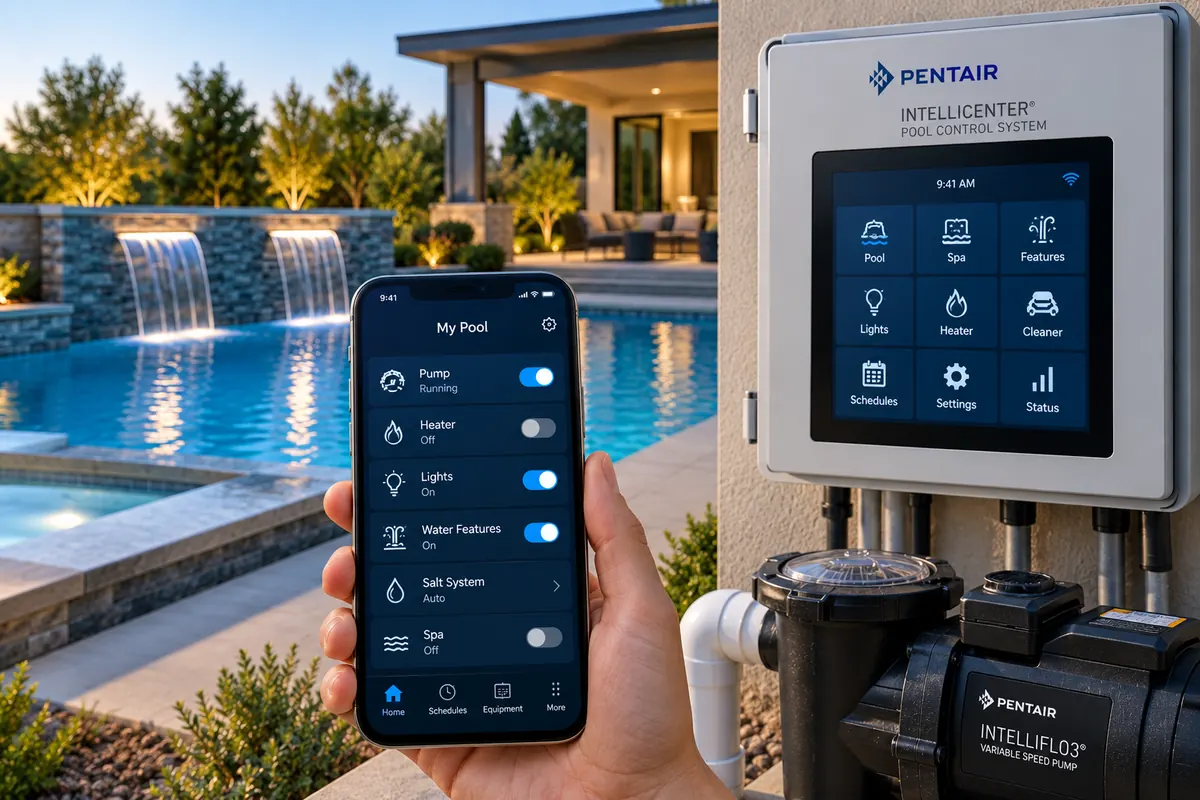
Modern swimming pools can contain pumps, heaters, lights, sanitation equipment, valves, cleaners, spas, and water features. Pool automation brings compatible equipment together so these systems can be controlled and scheduled from one place.
This guide explains how pool automation works, what equipment can be controlled, how remote access and scheduling function, and what to consider when choosing an automation platform.
Quick Answer: What Does Pool Automation Do?
Pool automation coordinates compatible swimming pool and spa equipment through a central controller. Depending on the system, it can schedule pump speeds, control heating, operate motorized valves, switch lighting and water features, manage supported sanitation equipment and provide remote access through a smartphone app.
The most important factor when choosing automation is equipment compatibility. A controller must support the specific pumps, heaters, lights, valves and other equipment installed at your pool. It also needs enough circuits, communication interfaces and expansion capacity for the functions you intend to use.
Pool Automation at a Glance
| Equipment or Function | What Automation Can Do | What to Verify |
|---|---|---|
| Variable-speed pump | Coordinate speeds and schedules for different functions | Exact pump model and supported communication protocol |
| Heater or heat pump | Coordinate heating with circulation and temperature settings | Heater interface and supported control functions |
| Motorized valves | Change water flow between pool, spa and features | Valve-actuator compatibility and controller capacity |
| Pool lighting | Control schedules, switching and supported color programs | Lighting type, electrical requirements and control interface |
| Salt chlorine generator | Coordinate supported sanitation settings and status | Exact generator and controller compatibility |
| Water features | Operate associated pumps and valves | Required circuits, relays and valve functions |
| Smartphone access | Provide supported remote monitoring and control | Network hardware, app support and internet requirements |
What Is Pool Automation?
Pool automation is a centralized control system for compatible swimming pool and spa equipment.
Instead of operating each component independently, automation allows equipment functions to be coordinated through a control panel, programmed schedules, remote controls or smartphone applications.
For a closer look at the basic control process, see How Does Pool Automation Work?
What Can Pool Automation Control?
Depending on the system and installed equipment, automation may manage:
- Single-speed pumps.
- Variable-speed pumps.
- Pool heaters.
- Heat pumps.
- Pool and spa lighting.
- Water features.
- Valve actuators.
- Pressure-side cleaner pumps.
- Salt chlorine generators.
- Other compatible sanitation equipment.
- Spa operation.
- Auxiliary electrical equipment.
For example, Pentair IntelliCenter systems support a range of pool and spa functions, including pumps, lighting, sanitation equipment, auxiliary circuits, valves and scheduling. The specific capabilities depend on the installed controller and expansion hardware.
When comparing automation systems, begin with the equipment and functions the controller needs to support rather than choosing solely by brand or app features.
Compare Pool Automation Systems on Amazon
How Does a Pool Automation System Work?
The automation controller acts as the central command center.
Equipment can be controlled through several methods depending on its design.
Some equipment is switched through electrical relays. Compatible smart equipment can communicate more directly with the automation system, allowing additional control over settings such as pump speed or equipment status.
The distinction matters because basic on/off control does not necessarily provide access to a device's advanced functions.
What Are Automation Circuits?
Automation systems use circuits to organize controlled equipment and functions.
High-voltage auxiliary circuits can operate compatible electrical loads. Advanced systems may also provide feature circuits for functions that do not require another high-voltage relay.
System capacity matters because every installation has a limited number of supported circuits, relays, valves, pumps and other devices.
Count the functions you need to control before choosing a controller. Also check whether a particular function requires a physical relay, a valve actuator, a communication connection or a combination of components.
Pool Automation and Variable-Speed Pumps
Variable-speed pumps are an important application for modern pool automation because a pool does not require identical flow for every function.
Compatible automation can coordinate different pump speeds with:
- Routine filtration.
- Heating.
- Spa operation.
- Cleaning.
- Water features.
- Sanitation.
This can make the pump's flexibility easier to use consistently. However, not every automation controller can digitally communicate with every variable-speed pump.
See Pool Automation and Variable-Speed Pumps for more about coordinating pump speeds, schedules and pool functions.
Pool Automation and Heating
Compatible heaters and heat pumps can be incorporated into an automation system.
The controller can coordinate heating with circulation and temperature settings. On pool-and-spa systems, automation can simplify switching between pool and spa heating requirements.
See Pool Automation and Pool Heaters for more about temperature control, circulation, schedules and equipment compatibility.
Pool Automation and Valve Actuators
Motorized valve actuators allow compatible plumbing valves to change position automatically.
This is particularly useful for shared pool-and-spa equipment. When spa mode is activated, the system can reposition appropriate valves and coordinate pump and heater operation rather than requiring the owner to manually change plumbing valves.
The plumbing layout and valve configuration must support the intended operating modes.
Pool Automation and Lighting
Lighting circuits can be incorporated into automation schedules and remote controls.
Compatible color-lighting systems may provide additional control over colors or lighting programs. Multiple lighting circuits can also be grouped on systems that support that functionality.
See Pool Automation and Pool Lights for more about lighting circuits, schedules, remote control and compatibility.
Pool Automation and Water Features
Waterfalls, fountains, deck jets, spillways and other water features may require pumps, valves or both.
Automation can coordinate these components so features can be activated without manually adjusting equipment at the pad.
Confirm the required pump flow, valve positions and electrical controls for each feature before configuring automation.
Pool Automation and Saltwater Systems
Compatible salt chlorine generators can be incorporated into certain automation platforms. This can centralize supported sanitation settings and status information.
Salt systems still depend on appropriate water chemistry, adequate salt concentration, sufficient flow and proper cell operation. Automation does not eliminate those requirements.
Can You Control a Pool From Your Phone?
When properly connected to the required network and internet services, compatible automation systems can allow owners to monitor and control equipment through a smartphone app.
For example, Pentair IntelliCenter can be integrated with the Pentair Pool app for supported remote equipment management.
If smartphone control is a priority, compare network-enabled automation options while checking the exact connectivity requirements of each system.
Compare Pool Automation Wi-Fi Controllers on Amazon
What Can a Pool Automation App Do?
Features vary by manufacturer, controller and connected equipment, but may include:
- Checking equipment status.
- Turning supported equipment on and off.
- Changing schedules.
- Adjusting heating settings.
- Controlling lighting.
- Activating water features.
- Managing pool and spa functions.
- Receiving supported system alerts.
Verify the exact functions available for your intended controller and equipment combination.
Pool Automation Scheduling
Scheduling reduces the need to operate equipment manually every day. A properly configured system can coordinate circulation, heating, lighting, sanitation and other functions around predetermined operating times.
Advanced systems can support many programmable schedules. The number and type of schedules available depend on the controller and its configuration.
Practical Example: A Pool-and-Spa Schedule
Consider a hypothetical pool with a variable-speed pump, gas heater, motorized valves, salt chlorine generator and pool lighting.
| Operating Mode | Example Automation Actions | Important Requirement |
|---|---|---|
| Routine filtration | Run the pump at a programmed circulation speed | Maintain adequate flow for connected equipment |
| Pool heating | Coordinate pump operation and pool temperature setting | Meet the heater's required flow |
| Spa mode | Reposition valves, change pump speed and use spa heating settings | Correct plumbing and valve configuration |
| Salt chlorine generation | Operate during appropriate circulation periods | Meet generator flow and operating requirements |
| Evening lighting | Switch supported lights on and off at scheduled times | Compatible lighting controls |
This example illustrates how automation can coordinate equipment. It is not a universal schedule or a recommended pump-speed setting.
Actual schedules must be configured for the installed equipment, water-treatment requirements and pool usage.
Can Pool Automation Save Energy?
Automation itself does not make inefficient equipment efficient. Its potential energy advantage comes primarily from operating equipment more deliberately.
For example, a variable-speed pump can be scheduled around the flow requirements of different pool functions rather than running at a high speed whenever the system is operating.
Heating schedules can also help avoid unnecessary operation. Actual savings depend on equipment, settings, operating conditions and previous usage.
Does Pool Automation Need Wi-Fi?
Local automation functions and remote internet control are not necessarily the same thing.
A controller may continue operating programmed pool functions even when remote app connectivity is unavailable. Network connectivity is generally required for cloud-based remote access and related connected features.
Check how your chosen system behaves during internet outages before relying on remote-only functions.
Wired vs. Wireless Network Connections
Some automation systems support wired Ethernet, wireless networking or both, depending on configuration.
Equipment pads can be challenging wireless locations because of distance from the home, building materials, landscaping and equipment enclosures.
Network planning should therefore be part of automation planning rather than an afterthought.
Pool-Only vs. Pool-and-Spa Automation
A basic pool may require only a few controlled functions.
A shared-equipment pool and spa can be substantially more complicated because automation may need to coordinate:
- Intake valves.
- Return valves.
- Pump speeds.
- Heating.
- Spa temperature.
- Spa jets.
- Lighting.
- Water features.
Choose a system with enough capability for the actual installation.
How Much Automation Capacity Do You Need?
Do not size an automation system only around the equipment installed today.
Consider potential future additions such as additional lighting, water features, sanitation equipment, pumps, pool heating or spa equipment.
Expandable automation can reduce the likelihood that a future upgrade requires replacing the entire control platform.
Equipment Compatibility Is Critical
Not every pump, heater, light, chlorinator or automation controller communicates with every other product.
Some combinations support advanced digital communication, while others provide only basic relay control.
Equipment Compatibility Checklist
- Confirm the exact controller model and hardware revision.
- Check compatibility with each pump model.
- Verify supported heater-control functions.
- Check the number of available relays and valve connections.
- Confirm lighting-control compatibility.
- Verify salt-generator integration where required.
- Check networking and remote-access requirements.
- Review expansion options and manufacturer support.
Verify compatibility before purchasing equipment, especially when mixing manufacturers.
Should All Pool Equipment Be the Same Brand?
Not necessarily. However, equipment from the same automation ecosystem may provide access to advanced communication features that are unavailable when mixing brands.
When combining manufacturers, determine exactly which functions remain available rather than assuming complete integration.
If you are building around a particular manufacturer's equipment ecosystem, Pentair IntelliCenter, Hayward OmniLogic and Jandy AquaLink are automation families you may encounter. Verify the exact controller, expansion hardware and equipment compatibility before purchasing.
Compare Pentair IntelliCenter Pool Automation on Amazon
Compare Hayward OmniLogic Pool Automation on Amazon
Compare Jandy AquaLink Pool Automation on Amazon
What About Older Automation Systems?
Automation technology changes over time. Manufacturers may discontinue older platforms while providing upgrade paths for some existing installations.
For example, Pentair discontinued IntelliTouch and EasyTouch systems in 2023 and has offered IntelliCenter upgrade options for certain legacy installations.
Before replacing an older system, check the manufacturer's current upgrade documentation and confirm which existing components can be retained.
Firmware and Software Updates
Modern automation controllers can depend on software as well as hardware. Manufacturers may release firmware updates for stability, compatibility or additional features.
Follow manufacturer instructions carefully because update procedures can vary by installed firmware version. Some systems require intermediate updates rather than a direct jump to the newest release.
Common Pool Automation Problems
Automation problems may involve network connectivity, incorrect schedules, equipment communication, valve configuration, sensors, electrical relays, software configuration, firmware or equipment compatibility.
| Symptom | Possible Cause | Initial Check |
|---|---|---|
| Phone app cannot connect | Network, internet or remote-access issue | Check whether equipment still operates from the local controller |
| Pump runs at an unexpected speed | Overlapping schedules or incorrect function settings | Review programmed schedules and pump-control configuration |
| Heater does not respond | Flow, communication, temperature or control issue | Check heater status and supported controller settings |
| Valve does not change position | Configuration, actuator or wiring issue | Check controller status and follow manufacturer diagnostics |
| Lighting function is unavailable | Unsupported lighting interface or configuration | Confirm exact model compatibility and circuit setup |
| Equipment stops following schedules | Schedule conflict, configuration or controller issue | Review schedules and controller status |
Do not open energized control panels or attempt electrical repairs unless qualified. Follow the manufacturer's diagnostic procedures.
Local Control vs. Remote Control Problems
If pool equipment still operates correctly from the local automation panel but the smartphone app cannot connect, the problem may be networking or remote access rather than the pool equipment itself.
This distinction can make troubleshooting easier.
For a focused troubleshooting process, see Pool Automation Not Connecting to Wi-Fi.
Is Pool Automation Worth It?
The practical value of automation depends heavily on pool complexity and the functions you use.
A simple pool with one pump and very little additional equipment may receive limited benefit from a sophisticated automation system.
A shared-equipment pool and spa with variable-speed pumps, heating, lighting, motorized valves, water features and sanitation equipment may require more frequent equipment coordination.
Automation can simplify those tasks, but its purchase and installation costs should be considered alongside the convenience and functionality it provides.
What to Look for in a Pool Automation System
- Equipment compatibility.
- Pool-only or pool-and-spa capability.
- Number of relays.
- Number of supported pumps.
- Valve-actuator capacity.
- Lighting support.
- Heating support.
- Sanitation integration.
- Scheduling capacity.
- Smartphone access.
- Network connection options.
- Expansion capability.
- Software and firmware support.
- Replacement-part availability.
- Professional support.
Once you know the equipment, capacity and compatibility requirements for your pool, compare available automation systems rather than selecting one solely by its advertised feature count.
Compare Pool Automation Systems on Amazon
Don't Choose Automation Based Only on the App
A smartphone interface can be convenient, but the underlying hardware and equipment compatibility are fundamental.
The controller must have enough capacity and appropriate interfaces for the equipment installed at the pool.
Start with the equipment and functions you need to control, then evaluate the interface used to control them.
Plan Automation Before Building a Pool When Possible
Automation is easier to design when electrical capacity, communication wiring, valves, plumbing, equipment locations and network connectivity are considered during the original pool design.
Existing pools can still be automated, but retrofits may require additional electrical, plumbing, networking or equipment changes.
Frequently Asked Questions
Can pool automation control equipment from different brands?
Sometimes. Compatibility varies by controller and equipment model. Some combinations support advanced digital communication, while others allow only basic on/off control.
Does pool automation require Wi-Fi to run schedules?
Not necessarily. Some controllers continue running local schedules without an internet connection. Remote smartphone access generally requires suitable network connectivity.
Can automation control a variable-speed pool pump?
Compatible systems can coordinate pump speeds with filtration, heating, spa operation and other functions. Verify support for the exact pump and controller models.
Can pool automation reduce electricity use?
It can help by coordinating equipment schedules and pump speeds, but savings depend on the equipment, previous operating schedule and actual flow requirements.
Can I add automation to an existing pool?
Many existing pools can be retrofitted, but the work may require electrical, plumbing, communication or equipment changes. Assess compatibility and installation requirements before purchasing.
Do I need a sophisticated controller for a basic pool?
Not necessarily. A basic pool with limited equipment may need only simple scheduling or individual equipment controls. More complex installations can benefit from additional coordinated functions.
Can automation control both a pool and a spa?
Compatible pool-and-spa controllers can coordinate pumps, motorized valves, heating and other supported functions. The plumbing and equipment must be configured for the intended operating modes.
What happens if the internet goes down?
Some systems continue running local schedules while remote app access is unavailable. Check the manufacturer's documentation for the exact controller and configuration.
Bottom Line
Pool automation coordinates compatible pumps, heaters, lighting, valves, sanitation equipment, cleaners, spas and water features through a central controller.
Choose a system that supports your existing equipment, has enough capacity for planned additions and provides the specific functions you intend to use. Verify model-level compatibility and installation requirements before purchasing.
How We Research
Pool Equipment Lab evaluates pool equipment using manufacturer specifications, documentation, compatibility requirements, operating costs, warranty information, and owner feedback when relevant. We do not claim hands-on testing unless we actually performed it.